Chrome Extension — Coming Soon

Write better prompts,
get better answers.

PromptForge intercepts your prompts before they send, guides you through a structured framework, and injects an enhanced version — all without leaving the page.

⚡ Works on ChatGPT, Claude & Gemini 🎯 12 prompt frameworks 🔒 Zero data collection No accounts. No tracking. Free during beta
How it works

12 frameworks.
One smarter prompt.

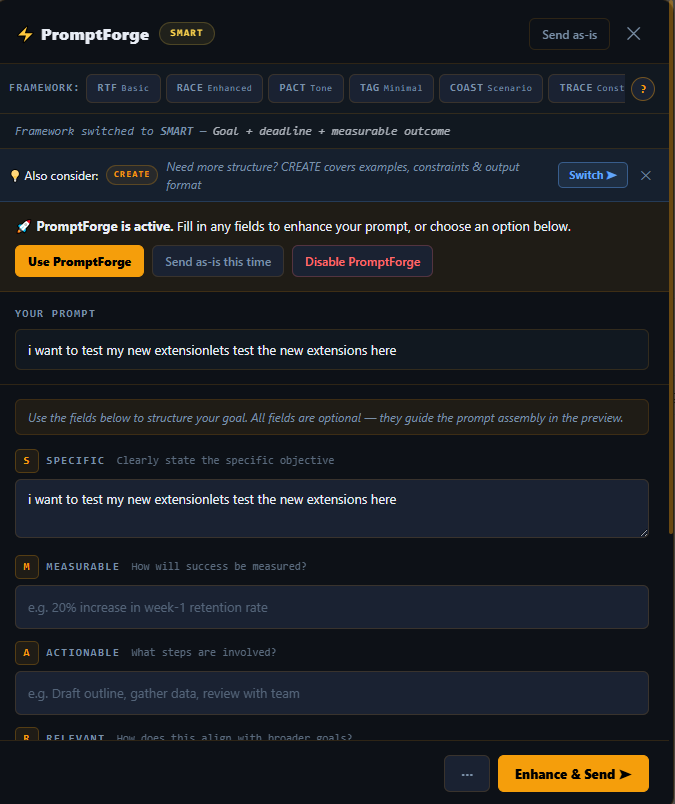
Based on the PMI Prompt Engineering Workbook (2024). PromptForge automatically classifies your prompt and selects the right framework — or you can switch manually inside the modal.

Simple
Everyday & quick prompts
  • RTF — Role / Task / Format. The default for short requests.
  • RACE — Role / Action / Context / Expectation. Adds context and outcome.
  • PACT — Purpose / Action / Context / Topic. Focuses on intent and topic scope.
  • TAG — Task / Action / Goal. Ultra-compact three-field structure.
Scenario
Rich context & narrative prompts
  • COAST — Context / Objective / Actions / Scenario / Task. Situational framing.
  • TRACE — Task / Role / Audience / Context / Expectation. Audience-aware prompts.
  • RISEN — Role / Instructions / Steps / End goal / Narrowing. Step-by-step workflows.
  • COSTAR — Context / Objective / Style / Tone / Audience / Response. Full narrative control.
Complex
Advanced reasoning techniques
  • CoT — Chain of Thought. Instructs the AI to reason step-by-step before answering.
  • Few-Shot — Provide input/output examples so the AI learns the pattern from demonstrations.
Goal + Technique
Objective-driven prompts
  • SMART — Specific / Measurable / Achievable / Relevant / Time-bound. Auto-triggered by deadlines and goals.
See it in action

The modal, up close.
Three frameworks. One workflow.

Click a framework tab to see exactly what PromptForge shows you — right inside ChatGPT, Gemini or Claude, without leaving the page.
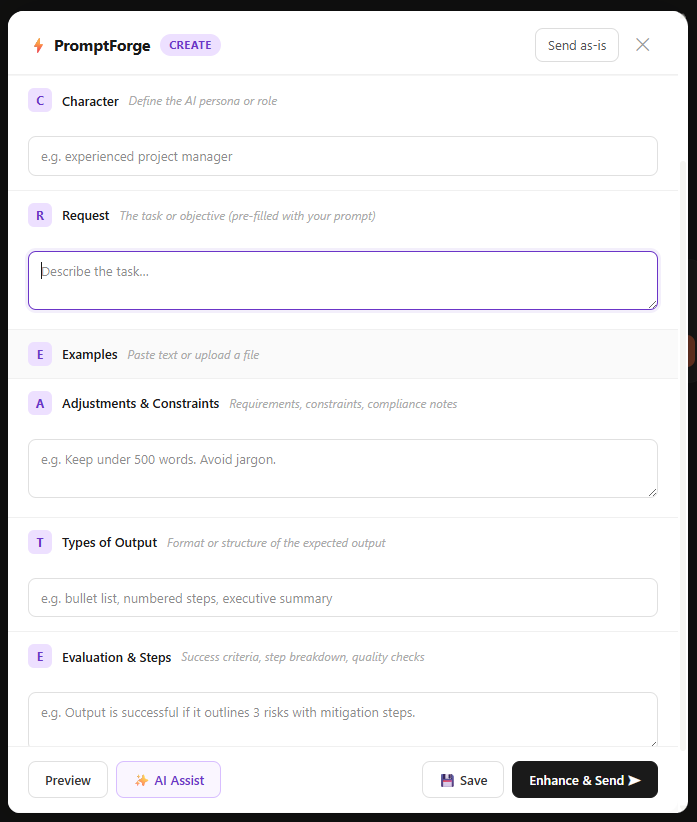
PromptForge CREATE framework modal — six fields: Character, Request, Examples, Adjustments, Types of Output, Evaluation
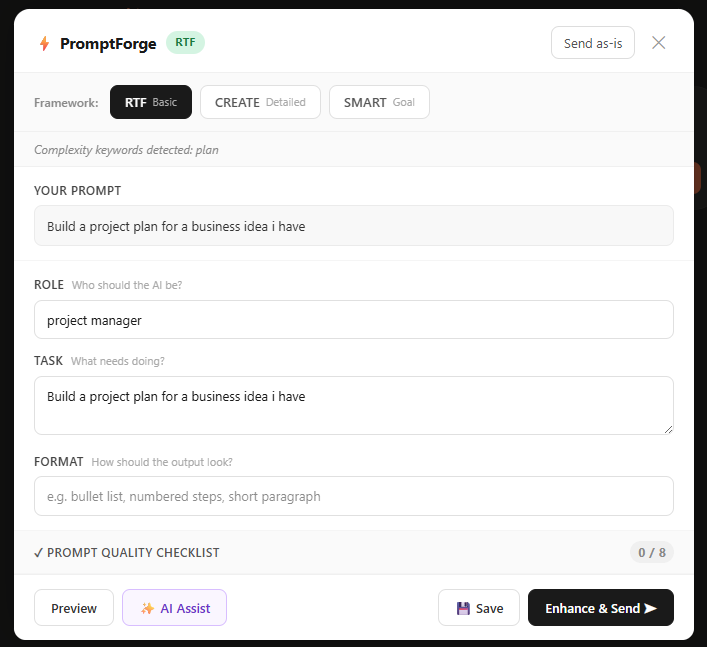
PromptForge RTF framework modal — Role, Task, and Format fields with prompt quality checklist
PromptForge SMART framework modal — Specific, Measurable, Achievable, Relevant, Time-bound fields
Settings
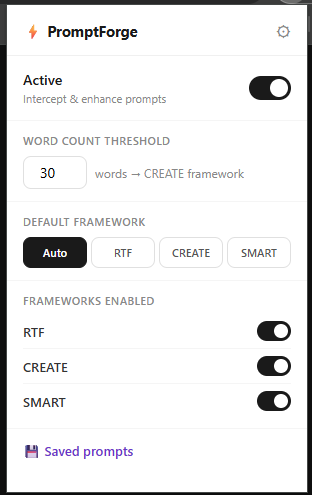
PromptForge settings popup — toggle active state, word count threshold, default framework

Toggle on/off, set your word count threshold, and pick a default framework — right from the toolbar.

Saved prompts
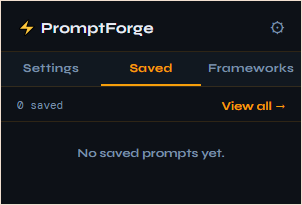
PromptForge saved prompts tab — recent enhanced prompts with copy buttons

Every enhanced prompt is saved locally. Copy or review any time — no account needed.

Frameworks
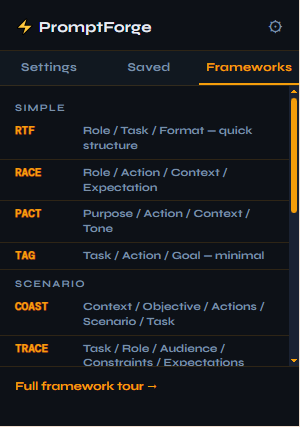
PromptForge frameworks tab — all 12 frameworks grouped by category

All 12 frameworks at a glance — grouped by category with one-line descriptions.

Features

Everything you need
to prompt better.

🎯 Auto-classifier
Detects complexity — picks the right framework
Includes a reason line explaining the choice
❓ Help-choose panel
Not sure which framework to use?
Inline decision guide with 12-item checklist
💡 Auto-advise
Secondary framework suggestion shown inline
Dismiss anytime, or disable in settings
👁️ Live preview
Assembled prompt updates as you type
Edit inline — what you see is what gets sent
✅ Quality checklist
Auto-ticks as fields are filled
Score shown in collapsed header — colour-coded
✨ AI Assist
Clipboard meta-prompt for improvement suggestions
One click — no API calls from extension
💾 Save & Download
Every enhanced prompt auto-saved locally
Search, copy, download .md or export JSON
🔄 Per-framework toggles
Enable or disable any of the 12 frameworks
Grouped by category in settings
🗺️ Framework tour
Built-in onboarding for new users
Launch from the ? help panel anytime
✏️ Smart pre-fill
Role, Format, Deadline fields pre-populated
Edit, don't start from scratch
⚡ Quick disable
Press Alt+Shift+P to pause instantly
Re-enable from toolbar popup
🔒 Privacy-first
Zero external requests from the extension
No telemetry. No tracking. Ever.
Beta Access

Try PromptForge now.
Free during beta.

PromptForge isn't on the Chrome Web Store yet — but you can install the beta build in under two minutes. No sign-up. No account. Just download, unzip, and load.

⬇ Download Beta v1.2.0

promptforge-1.2.0-beta.zip · ~47 KB · Chrome only

1
Download & unzip
Save the zip anywhere and extract it to a permanent folder — Chrome loads from it each time.
2
Open Extensions
Go to chrome://extensions and enable Developer mode (top-right toggle).
3
Load unpacked
Click Load unpacked and select the promptforge folder you just unzipped.
4
Pin & go
The ⚡ icon appears in your toolbar — pin it. Open ChatGPT or Claude, type a prompt, and press Enter.
Privacy by design

Your data never
leaves your machine.

🚫
No accounts
No sign-up, no login. Install and start using immediately with zero friction.
📡
No API calls
Zero external network requests. Verified via Chrome DevTools Network tab.
💾
Local storage only
History and settings live in chrome.storage.local on your machine.
👁️
No telemetry
No usage tracking, no analytics, no crash reporting sent anywhere, ever.
Part of JTC Tech — privacy-first AI tools built in South Africa 🇿🇦